
A beautiful glassmorphism dashboard that replaces your new-tab page — keeping your focus, workspaces, and daily tools one keystroke away.
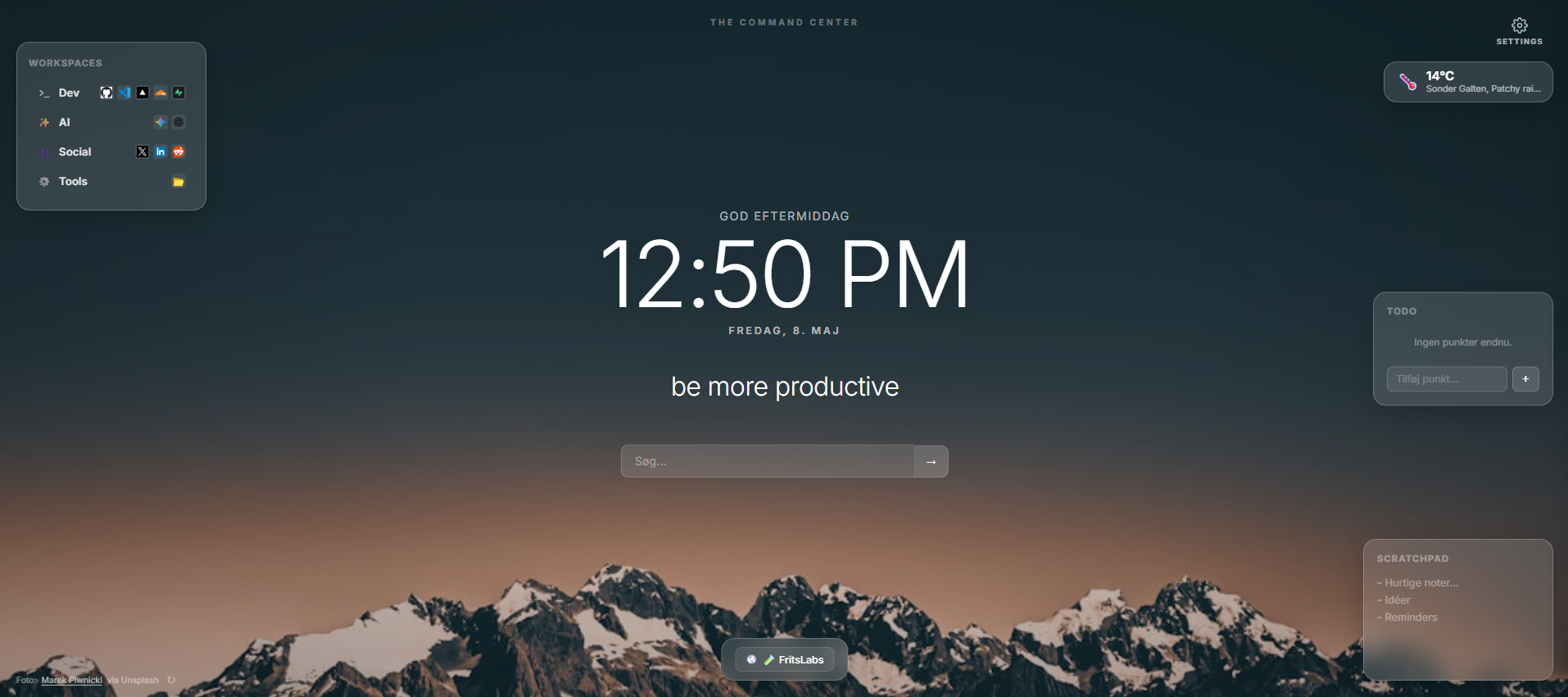
Every feature is optional — enable only what serves you.
Minimal full-screen clock with Danish weekday + month. Always visible, never in the way.
Set your main intention for the day. The prompt disappears once you've committed — keeping you accountable.
Organise your most-used links into named workspaces. Switch context with a glance, not a search.
A persistent scratch area for quick notes and reminders. Auto-saved, always there.
Live weather in the top corner via wttr.in — no account or API key required. Just enter your city.
Fresh, stunning photos every hour from Unsplash. Or choose one of 6 built-in gradient presets.
Dette er det, der adskiller de gode extensions fra de dårlige.
Alle dine data — noter, links, workspaces, indstillinger — gemmes udelukkende i din browsers localStorage og Chrome Sync. Ingenting forlader din enhed.
Command Center sender ikke dine noter, links eller søgninger til nogen server. Vi ved bogstaveligt talt ikke, hvad du skriver.
Koden er offentlig tilgængelig. Du behøver ikke stole på vores ord — du kan verificere det selv.
Grab the extension ZIP and unzip it anywhere on your computer.
Open chrome://extensions, enable Developer Mode, and click Load unpacked.
That's it — your Command Center is live. Open Settings to personalise.
Free, open-source, no account needed.
⬇ Download Command CenterManifest V3 · Chrome 88+ · Edge 88+